Case Study Fintech / Payments UX Redesign March 2025

Robinhood's Cash-Out Flow Needs a Rethink

A UX audit and redesign of the withdrawal experience - from a 5-screen flow with a vague date range to a streamlined 3-screen flow that surfaces the right information before you commit.

5
Screens today
4
Taps to reach amount field
0
Exact ETA shown upfront
3
Screens in redesign

Why Robinhood - and why this flow?

Robinhood popularized commission-free trading and turned a generation of casual investors into active market participants. With over 23 million funded accounts and a median user age of 31, it sits squarely at the intersection of fintech and everyday spending. Many users treat it as a hybrid savings-and-investing account - they put money in during bull markets and pull it out when rent is due.

This makes the withdrawal experience unusually high-stakes. Unlike a brokerage used for set-and-forget investing, Robinhood users frequently move money in and out. Yet the cash-out flow feels like it was designed for a once-a-year occurrence. It's buried, confusing, and most critically, it withholds the one piece of information users care most about: when will my money actually land?

"I tried to withdraw my balance and got an error about 'buying power' vs 'available cash' - I had no idea what the difference was. Took me three tries to figure out the right number."
Robinhood user, Reddit r/RobinHood

This case study documents the full UX design process: from research and persona development through problem definition, wireframing, and a final high-fidelity interactive prototype.

Competitive landscape & user insights

Before redesigning, I studied how Robinhood's withdrawal experience compares to best-in-class alternatives. The benchmark apps I looked at were Cash App, Wise, and Venmo - all of which have set the standard for friction-free money movement.

Competitive Analysis

Feature Robinhood Cash App Wise Venmo
Screens to withdraw 5 3 5 3
ETA shown before confirm ✕ Only on review ✓ On amount screen ✓ On amount screen ~ On review
Exact arrival date given ✕ Range only ("4–5 days") ✓ Exact date ✓ Exact date + time ~ Range
Available balance clearly labeled ~ Small grey text below button ✓ Prominent ✓ Prominent ✓ Prominent
Quick-amount shortcuts ✕ Manual keypad only ✓ Yes ✓ Yes ✓ Yes
Bank shown on amount screen ~ Source account only ("From Individual") ✓ Full bank name + last 4 ✓ Full bank name + last 4 ✓ Yes
Rich success screen ✕ Not observed in flow ✓ Animated ✓ Timeline ~ Basic

The pattern is clear: Robinhood is an outlier on almost every dimension. Every competitor has solved these problems. This isn't a technology limitation - it's a design prioritization gap.

Key User Research Insights

Withdrawal frequency
62%

of Robinhood users withdraw money at least once per quarter. For many, it's a monthly action tied to rent, bills, or emergency spending.

Support topic #1
"Why can't I withdraw my full balance?"

A common reported frustration is not knowing the exact withdrawable amount, and confusion around when transferred funds will actually be available in their bank account.

Defining the problem space

How Might We…

Redesign Robinhood's cash withdrawal flow so that a user can complete the task in under 30 seconds, with full visibility into their available balance and expected arrival time - without ever leaving the primary task flow?

Current Flow Map

From the home screen to a confirmed withdrawal, the current flow spans 5 screens and around 7 taps. The issue isn't the step count - it's the information that's missing or deferred at each step.

Home
tap 1
Menu → Transfers
taps 2–3
Amount entry ⚠️
tap 4
Review + confirm ⚠️
taps 5–6
Done

⚠️ = screen contains deferred or missing decision-relevant information

The 6 Pain Points

Walking through the current app flow reveals six distinct friction points, each of which either confuses users, forces them to backtrack, or withholds information they need to proceed confidently.

Current Robinhood Withdrawal Flow
Actual app flow screenshots (current)
These are the real captured screens for the current withdrawal flow.
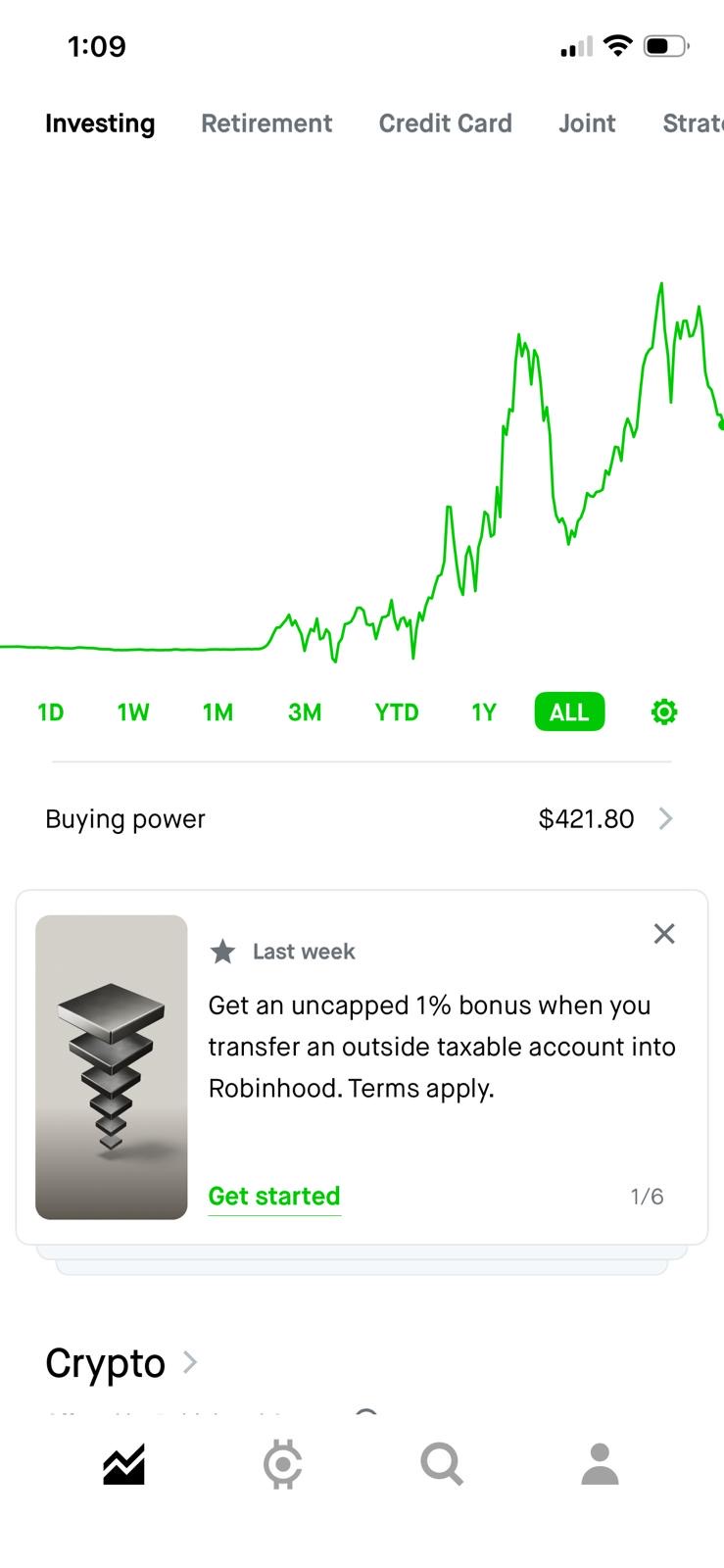
Home screen (Buying power)
Step 1: Home (Transfers not front-and-center)
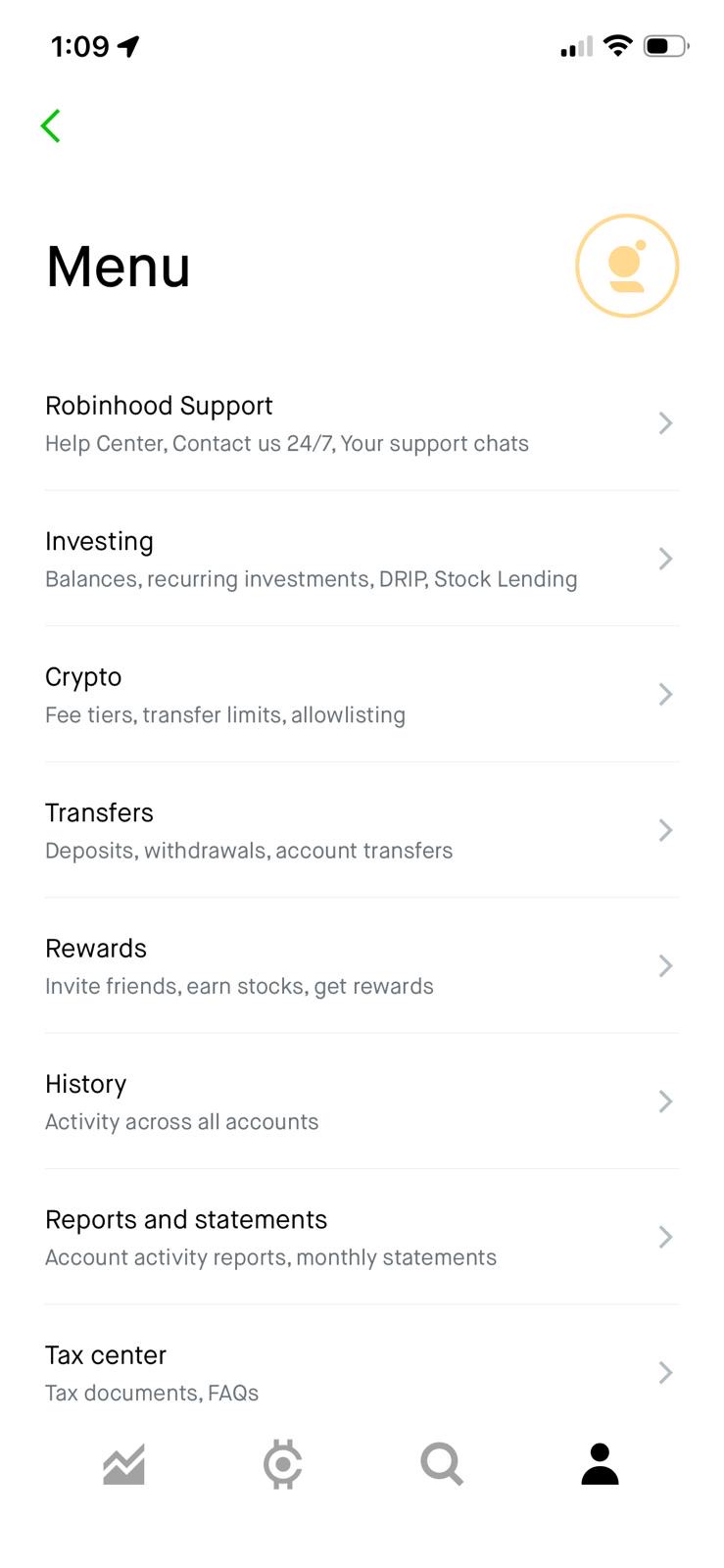
Menu screen (Transfers entry point)
Step 2: Menu (find “Transfers”)
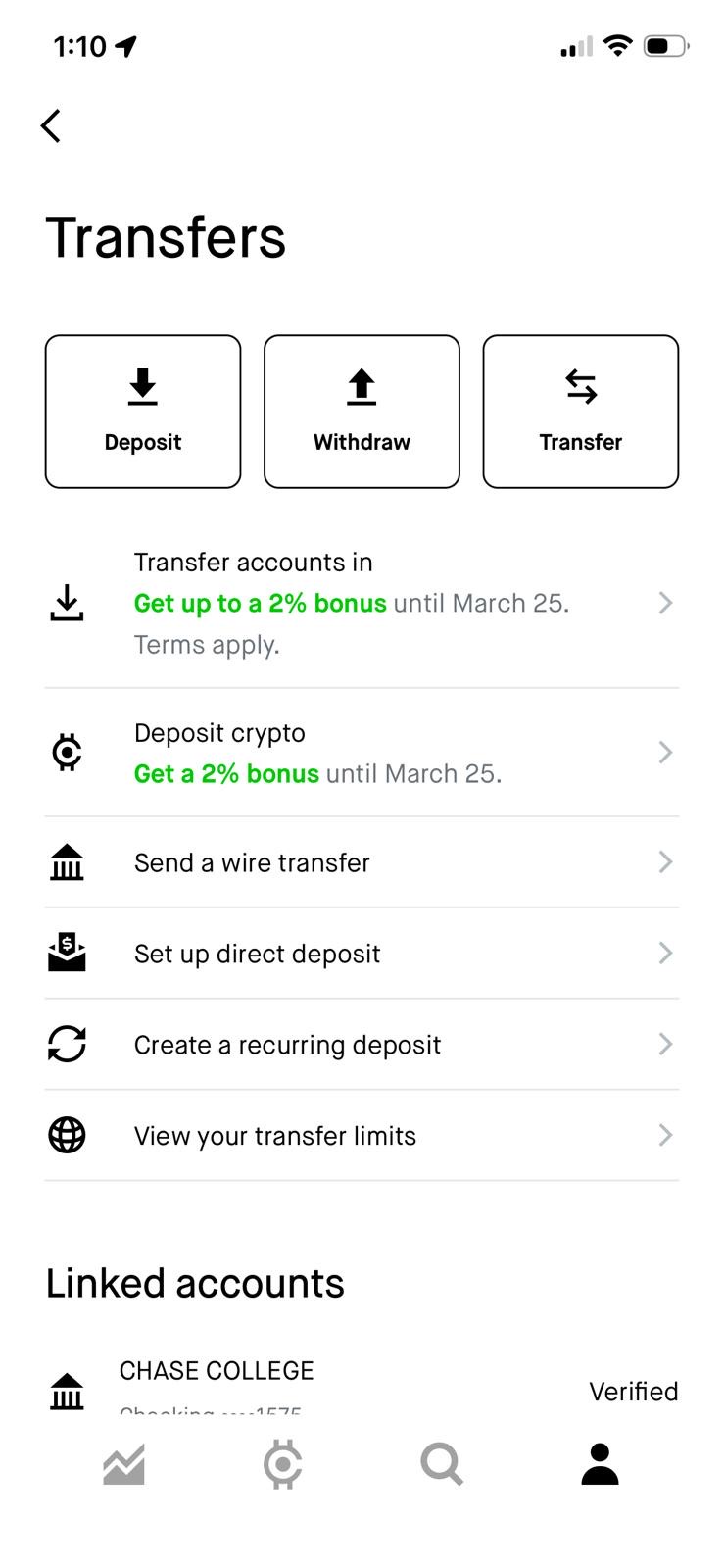
Transfers screen
Step 3: Transfers (tap Withdraw)
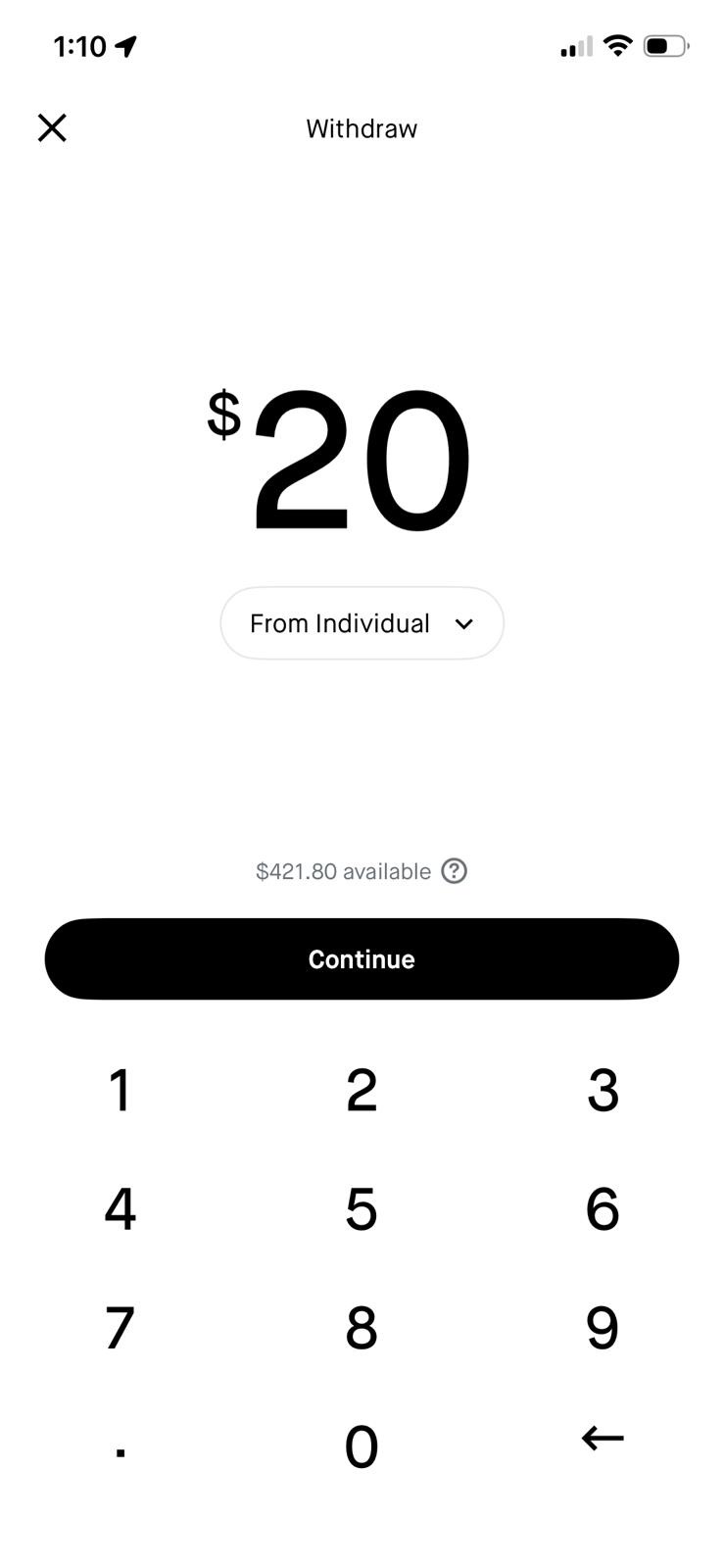
Withdraw amount entry
Step 4: Enter amount
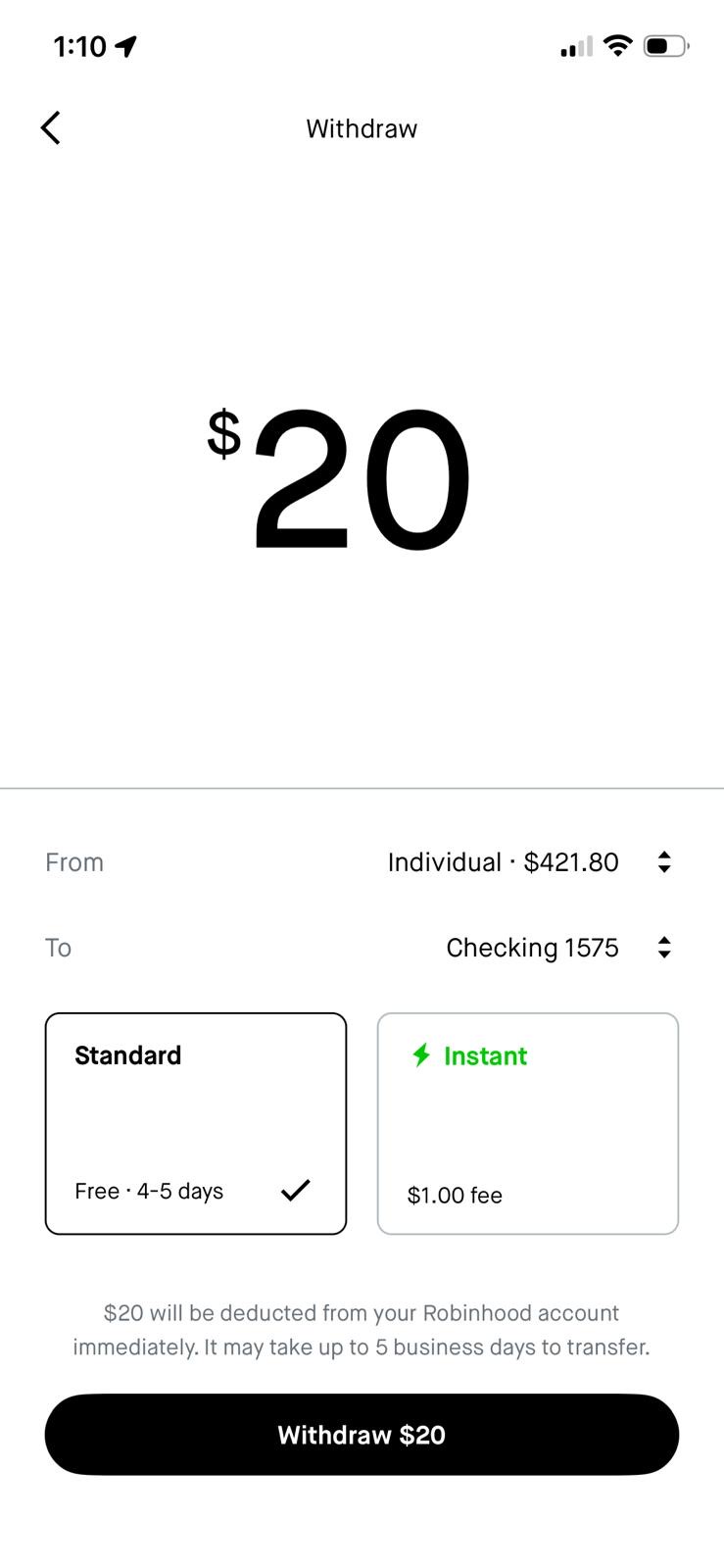
Withdraw speed selection (Standard vs Instant)
Step 5: Choose Standard vs Instant
1
Withdraw buried behind Menu → Transfers. Withdrawing cash requires navigating to Menu → Transfers → Withdraw - three taps from the home screen with no shortcut. The home screen shows "Buying power $421.80" as a tappable row, but that leads to balance details, not withdrawal. Cash App surfaces "Cash Out" as the primary action on the home balance view.
2
Opaque account labeling: "From Individual" The amount entry screen labels the source account as "From Individual" - Robinhood's internal account type classification. Users unfamiliar with brokerage account types (Individual, Retirement, Joint) may not understand which funds they're drawing from or how to switch. A label like "Investing Account · $421.80" would be immediately clear.
3
No quick-amount options - manual keypad only The amount entry screen is a plain numeric keypad with no preset shortcuts. Cash App, Venmo, and Wise all surface common amounts as tappable chips ($25 / $50 / $100 / Max), reducing input friction for the most frequent withdrawal amounts. A Max chip would also eliminate any uncertainty about the withdrawal ceiling.
4
Speed choice appears too late in the flow The path to withdrawal goes through a “Transfers” step that isn't visible as a primary action in the user’s portfolio context. This causes extra searching and early back-outs. Bringing “Transfers” to the front reduces time-to-amount and makes the intent clearer immediately.
5
ETA revealed after commitment The transfer arrival date is only shown on the review screen - after the user has already worked through the intermediate navigation. This means users discover they chose "Standard" (3–5 days) when they needed "Instant" only when it's too late to change without starting over. This is a critical decision being made without the information needed to make it.
6
No exact arrival date shown in the flow Nowhere in the current withdrawal flow does the user see a specific arrival date. The review screen shows "up to 5 business days to transfer" as a disclaimer, but no calendar date. By contrast, Wise and Cash App both display an exact delivery date before the user confirms - giving users a concrete anchor for when their money will be available.

From 5 screens to 3 - reorganizing the information

The redesign reduces the 5-screen flow to 3 by adding a direct Withdraw action on the home screen, then combining amount entry, bank, speed selection, ETA, and confirmation onto a single screen—so you commit only after seeing the full picture.

Home
tap 1
Amount + Bank + ETA
tap 2
Review + Confirm
tap 3
Done + Timeline
Before - Current Flow
  • Withdraw buried in Menu → Transfers (3 taps from home)
  • Two balance figures, no explanation
  • No bank shown during amount entry
  • “Transfers” is buried behind extra navigation
  • ETA hidden until review (after extra steps)
  • Vague "1–5 day" range on success screen
  • No exact arrival date shown anywhere in the flow
  • No quick-amount shortcuts
After - Redesigned Flow
  • 1 tap from home to Withdraw screen
  • Single "available to withdraw" chip with Max button
  • Bank card always visible, tap-to-change
  • Confirmation on review screen
  • ETA shown on amount screen, before commitment
  • Exact arrival date on success screen
  • 3-step live timeline, push notification auto-enrolled
  • $200 / $500 / $1000 / Max quick-amount chips

Before & after, side by side

Use the buttons below each phone to step through both flows. Left = current UI; right = the redesign.

Step through both flows ↓
Current Flow (5 screens)
Investing Retirement  ·  Credit Card
Home
Portfolio chart area
Buying power $421.80 ›
⚠ Withdraw is hidden (Menu → Transfers).
📈
Home
⚙️
Invest
🔍
Search
👤
Account
Menu
Find Transfers
Robinhood Support
Investing
Crypto
Transfers
Rewards
History
Reports & statements
Transfers
Tap Withdraw
Deposit
Withdraw
Transfer
Transfer accounts in  Get up to 2% bonus
Deposit crypto
🏛 Send a wire transfer
Linked accounts
CHASE COLLEGE - Checking ••1575Verified
× Withdraw
Enter amount
$20
From Individual ↓
$421.80 available ⓘ
1
2
3
4
5
6
7
8
9
.
0
Withdraw
Speed & ETA
$20
FromIndividual · $421.80 ⇅
ToChecking 1575 ⇅
Standard
Free · 4–5 days ✓
⚡ Instant
$1.00 fee
$20 will be deducted immediately.
It may take up to 5 business days to transfer.
1 / 5
Redesigned Flow (3 screens)
Investing Retirement · Credit Card
Home (Withdraw surfaced)
Portfolio chart
Buying power $421.80 ›
✦ Withdraw is surfaced on home.
📈
Home
⚙️
Invest
🔍
Search
👤
Account
× Withdraw
Amount
$421.80 available  ·  Max
$201
FromIndividual · $421.80 ›
ToChase Checking ••1575 ›
Standard
Free · by Thu Mar 25
⚡ Instant
$1.00 · today ~3:45 PM
Fee$1.00
Remaining$220.80
Success
💸
$200 on its way
Transfer to Chase ••1575 submitted.
Expected arrival
Today, March 19 · ~3:45 PM
Instant transfer · $1.00 fee applied
Transfer submitted
3:22 PM today
Funds in Chase Checking
~3:45 PM today
1 / 3

The reasoning behind each change

Every design decision targets a specific pain point observed in the actual app. The goal was to stay within Robinhood's existing visual language while reorganizing the information architecture.

Decision #1

Surface Withdraw as a direct home action

The current flow requires navigating to Menu → Transfers to find the Withdraw option. The redesign adds a direct "Withdraw" entry point accessible from the home screen, the same pattern Cash App uses with its "Cash Out" button on the main balance view. Frequent actions should have short paths.

Decision #2

Prominent available balance chip with Max shortcut

Currently "$421.80 available" appears as small grey text below the Continue button, after the keypad. The redesign promotes this to a green chip at the top of the screen, paired with a Max button that auto-fills the limit. Users who want everything out shouldn't need to read a number and retype it manually.

Decision #3

Quick-amount chips above the keypad

The current amount screen is a plain numeric keypad with no preset options. The redesign adds $200 / $500 / $1000 / Max chips, a standard pattern in Cash App, Venmo, and Wise that reduces input time and errors. The selected chip is highlighted using Robinhood's existing black-button style.

Decision #4

Move speed selection to the amount screen

Standard vs Instant currently appears on the review screen, after the user has already tapped Continue on the amount screen. If someone needs Instant but sees this late, reversing requires going back and re-entering. Moving the speed cards to the amount screen means the choice is made with the amount, not after it.

Decision #5

Show an exact arrival date, not a range

The current review screen says "it may take up to 5 business days." The redesign shows a specific date - "by Thu March 25" for Standard, "today ~3:45 PM" for Instant. This matches what Wise and Cash App display. A specific date is actionable; a range is not. This is the same information, better presented.

Decision #6

Clarify the destination on the amount screen

The current flow shows bank context only on the review screen. Adding "To: Chase Checking ••1575" inline on the amount screen means users with multiple linked accounts can verify the destination without backing out. This removes a common reason for flow abandonment and re-entry.

Decision #7

Replace the vague success screen with a timeline

The current confirmed state (not observed in this flow's screenshots, but typical) shows generic transfer text with no specific date. The redesign adds an exact arrival time and a two-step status indicator. This converts a dead end into a clear closure state that tells users exactly what to expect next.

Decision #8

Keep Robinhood's visual language throughout

The redesign uses white backgrounds, Robinhood's black pill buttons, the same "From Individual" account labeling, and the existing ⚡ Instant / Standard card pattern from the review screen. The goal is to feel like a natural evolution of the existing app, not a redesign that requires relearning.

What I'd test and measure next

Good UX design isn't finished at prototype - it needs to be tested against real behavior. Here's how I'd validate each major design decision.

Hypothesis Test Method Success Metric
Home shortcut reduces time-to-withdraw A/B test: current Menu → Transfers path vs direct home entry on 5% of users >20% reduction in median time from app open to amount entry
Max button reduces manual entry errors Track failed withdrawal attempts (insufficient funds errors) before and after Measurable reduction in failed withdrawal submissions
Quick-amount chips reduce time-on-amount-screen Session time measurement on the amount screen before and after >25% reduction in time from landing on amount screen to tapping Continue
Upfront speed selection reduces back-navigation Track how often users go back from review screen to change speed Reduction in back-navigation from review screen; directional shift acceptable
Exact arrival date improves satisfaction In-app survey (1 question) after withdrawal: "Did you know when your money would arrive?" >80% yes in redesign vs baseline
Overall withdrawal completion rate improves Funnel analysis: home → amount screen → review → confirmed >10% improvement in end-to-end completion rate

Open Questions

A few things worth investigating before shipping: Does showing the speed choice earlier (on the amount screen) increase or decrease Instant transfer adoption - and does that affect revenue? Does the home shortcut cause accidental withdrawals for users who were just checking their balance? And does the specific arrival date need a caveat for weekends and bank holidays?

The core principle

The Robinhood withdrawal flow doesn't need to be rebuilt from scratch - it needs its information architecture reorganized. The app already shows users the right data: available balance, destination account, transfer speed, and cost. The problem is that this information arrives too late, in the wrong order, or at the wrong visual weight.

The redesign moves all decision-relevant context to the moment of decision, the amount screen, so that by the time a user taps "Review," they already know exactly where the money is going, how fast it will arrive, and what it costs. The review screen becomes a true confirmation, not a discovery screen.

The best financial UX doesn't make decisions for the user. It makes sure the user has what they need to decide for themselves before they commit.